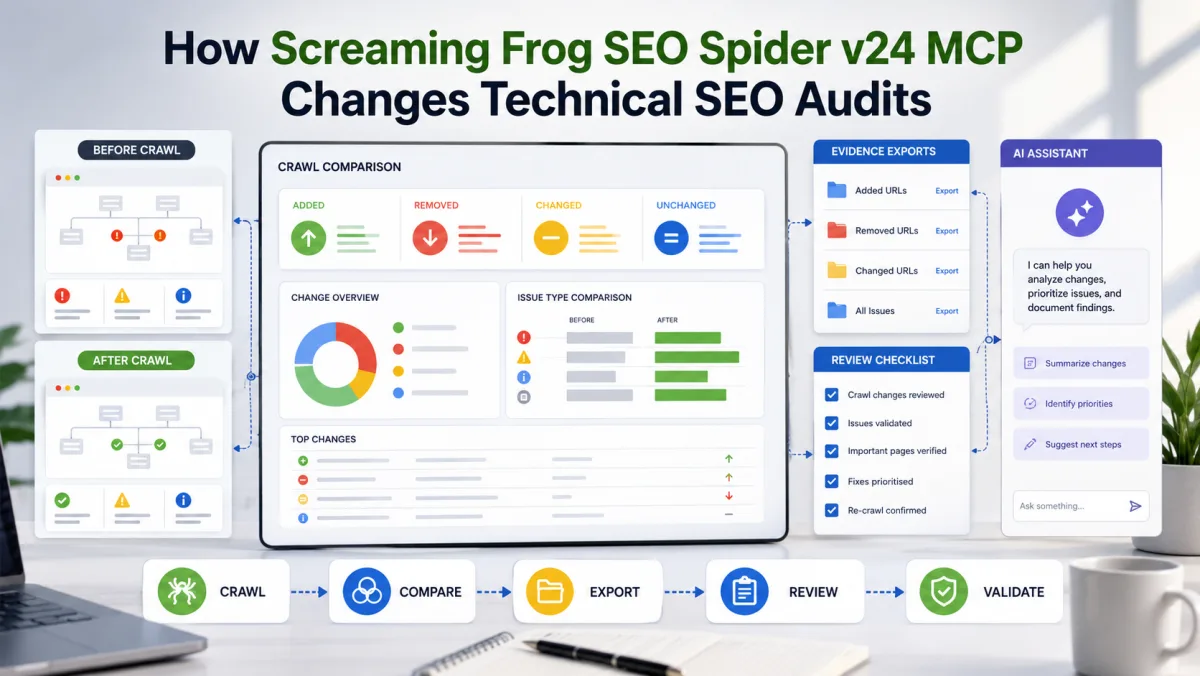
Screaming Frog SEO Spider v24 is not just another crawler update. The May 2026 release adds a native MCP server, which means compatible AI assistants can interact with crawl data, supported actions, exports, and audit workflows.
That changes the audit workflow.
It does not remove the need for technical SEO judgment. It removes some of the manual friction between crawling, exporting, comparing, summarizing, and documenting evidence.
For agencies and in-house teams, that is a meaningful shift. A technical SEO audit is rarely just "find broken links." It is a chain of work: configure the crawl, collect evidence, compare states, prioritize issues, write developer tickets, validate fixes, and explain business impact. MCP makes more of that chain available from an AI-assisted workspace.
The useful question is not "can AI do our SEO audits now?" It cannot. The useful question is: which repetitive audit steps can be automated while keeping the decisions reviewable?
What changed in Screaming Frog v24
Screaming Frog v24 introduced several features that matter for technical SEO operations:
- a native SEO Spider MCP server;
- auto-compare for scheduled and CLI crawls;
- crawl-change summaries in email notifications;
- automatic export attachments in crawl completion emails;
- a new way to identify common uncrawlable internal outlinks;
- improved handling of invalid links;
- additional AI integration controls, including model validation and system-wide prompts.
The MCP feature is the headline because it lets an AI assistant connect to the crawler instead of working from manually uploaded CSVs. The assistant can help inspect crawl data, generate summaries, request exports, and manipulate datasets through supported tools.
The auto-compare features matter because many SEO problems are change-detection problems. A site release adds noindex tags. A redesign removes internal links. A template update creates missing titles. A JavaScript change hides product copy from rendered HTML. A weekly crawl comparison is often more useful than a one-off audit because it shows what changed.
Why MCP matters for technical SEO
MCP, or Model Context Protocol, is a standard for connecting AI applications to external systems. In this case, the external system is a desktop SEO crawler with crawl databases, reports, exports, and configuration.
That matters because technical SEO work is data-heavy but context-sensitive.
A normal AI chat can explain what a canonical tag is. That is low value. A connected assistant can help answer more operational questions:
- Which high-click pages became non-indexable since the last crawl?
- Which internal links disappeared from the blog template?
- Which broken links also receive organic sessions?
- Which JavaScript-rendered pages have missing H1s?
- Which crawl issues changed after the deployment?
- Which export should be attached to a developer ticket?
The assistant is not making the crawl data true. Screaming Frog is still the crawler. Google's documentation still defines the search requirements. The SEO still decides priority. MCP just shortens the distance between raw crawl data and usable audit evidence.
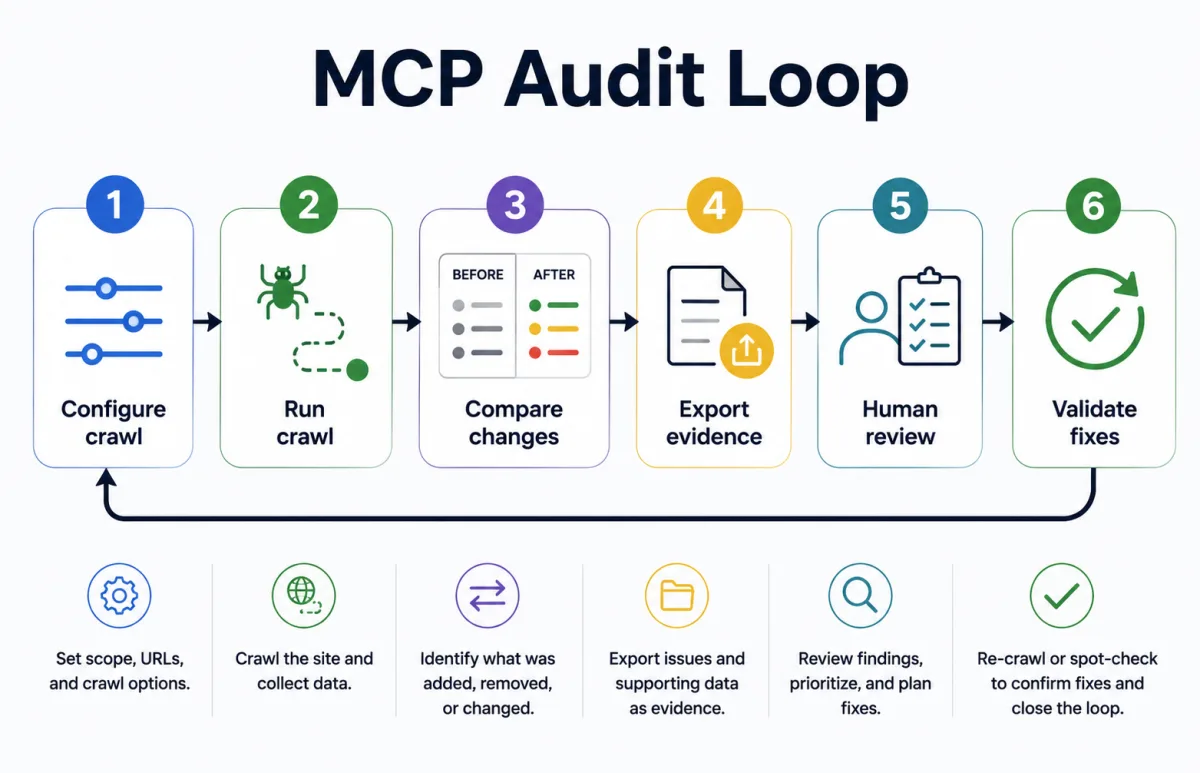
- Configure crawlSet scope, URLs, rendering, and crawl options.
- Run crawlCollect structured technical SEO data.
- Compare changesIdentify what was added, removed, or changed.
- Export evidenceAttach issue exports and supporting rows.
- Human reviewPrioritize, confirm intent, and plan fixes.
- Validate fixesRe-crawl or spot-check before closing the loop.
The practical audit workflow
1. Start with a controlled crawl, not a vague prompt
The weakest version of MCP auditing is opening an AI assistant and asking it to "audit this website." That produces generic reports.
A better workflow starts with a defined crawl profile:
- crawl mode: spider or list mode;
- rendering: text-only or JavaScript rendering;
- user agent and viewport;
- robots handling;
- sitemap inclusion;
- storage mode;
- API connections, if any;
- extraction settings;
- crawl limits;
- target sections or URL patterns;
- exports required for review.
For a JavaScript-heavy site, JavaScript rendering may be required to inspect rendered content. For a migration check, list mode with old and new URL sets may be more appropriate. For a weekly monitoring crawl, the crawl must be consistent enough that comparison data is meaningful.
The prompt should reference the crawl goal:
Run a JavaScript-rendered crawl of the staging site, compare it with the previous production crawl, and summarize changes in indexability, status codes, canonicals, page titles, H1s, internal links, and structured data. Do not recommend fixes without citing the relevant export rows.
That is a better starting point because it defines scope, evidence, and review behavior.
2. Use MCP for evidence collection and summaries
The main value of MCP is not that it writes a report. It is that it can help collect the right evidence before the report exists.
A reviewable workflow should ask for:
- issue summary by category;
- affected URL counts;
- priority URL samples;
- exports for each serious issue;
- comparison against previous crawl where available;
- notes on uncertainty;
- recommended next checks.
For example, if the crawl finds a spike in non-indexable pages, the assistant should not immediately write "fix noindex tags." It should first identify the affected templates, directives, canonicals, status codes, and internal links. A non-indexable page may be intentional. A canonicalized URL may be correct. A paginated or filtered page may need a different decision.
The output should separate facts from recommendations:
Fact: 126 URLs changed from indexable to non-indexable since the previous crawl.
Fact: 118 of those URLs are product category pages under/collections/.
Needs review: confirm whether this was part of the faceted navigation change.
Recommendation: do not remove directives until the template owner confirms intended indexation.
That is the difference between automation and uncontrolled advice.
3. Compare crawls before and after releases
Auto-compare is one of the most operationally useful v24 additions. Many technical SEO problems are introduced by normal site work: CMS changes, front-end refactors, redirects, navigation updates, cookie banners, personalization, or deployment mistakes.
A useful release QA workflow:
- crawl production before deployment;
- crawl staging before deployment where possible;
- crawl production after deployment;
- compare old production vs new production;
- inspect changes in indexability, status codes, canonicals, metadata, headings, internal links, structured data, and response times;
- export serious differences;
- send a short human-readable summary to the release owner.
This is especially relevant for SEO-first web development and migrations. A page can look fine in the browser while search-critical elements have changed. Crawl comparison catches template-level regressions faster than manual spot checks.
4. Treat uncrawlable links as implementation bugs
Screaming Frog v24 adds better reporting for common uncrawlable link formats. This is important because modern sites often use JavaScript navigation patterns that look clickable to users but are weaker for crawlers.
Google's link guidance is clear: links should use an anchor element with an href attribute. Script-only navigation, clickable spans, or JavaScript URLs are not a reliable foundation for internal linking.
This is not a cosmetic issue. Internal links help discovery, context, and site architecture. If important product, service, city, or blog pages are only reachable through weak link patterns, the site may be harder to crawl and understand.
An MCP-assisted audit can turn this into a developer-ready export:
- affected source URL;
- target URL, if detectable;
- link type;
- DOM pattern;
- template or component likely responsible;
- priority based on page type and internal importance;
- recommended implementation pattern.
The recommendation should be specific: replace script-only navigation with normal anchor links where a destination URL exists. Do not just say "fix links."
5. Export focused evidence for developers
Technical SEO recommendations fail when they are not actionable.
A developer does not need a 40-page PDF saying "some pages have missing canonicals." They need exact affected URLs, issue type, template pattern, before/after examples, acceptance criteria, export file, priority, and risk if ignored.
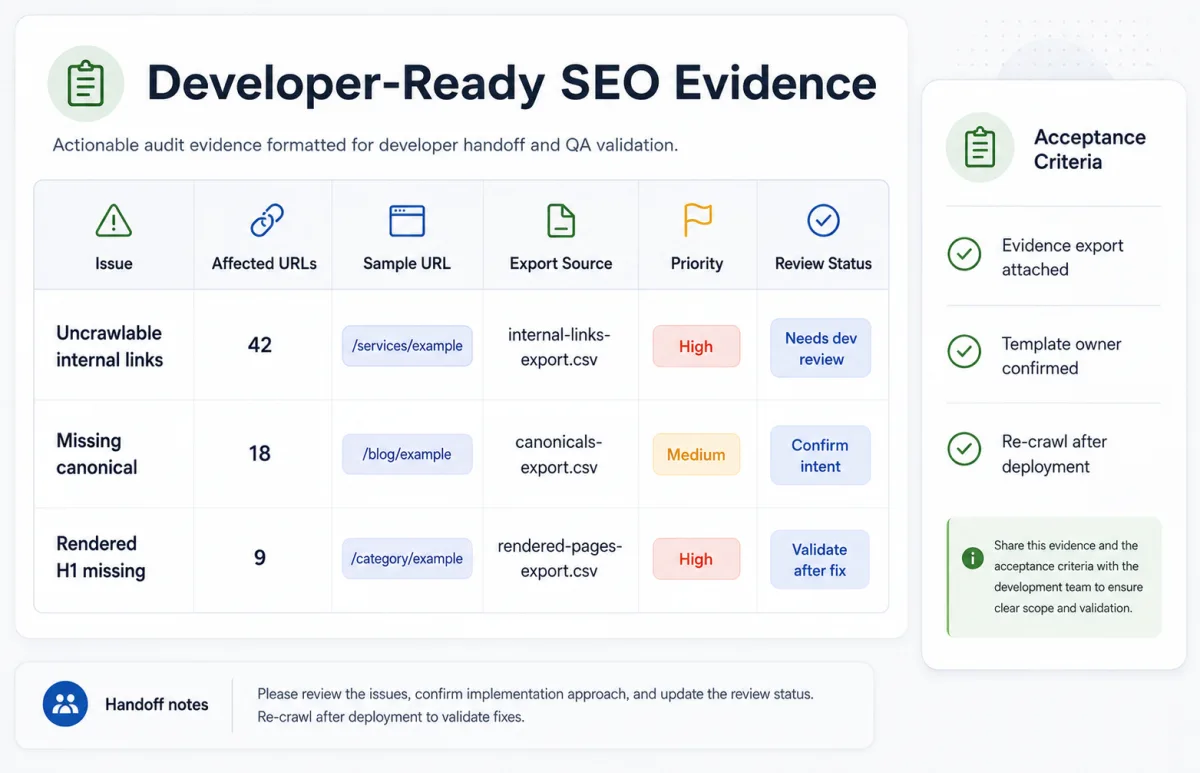
MCP can help prepare this evidence, but the workflow should require exports and samples. For each serious issue, ask the assistant to produce a ticket-ready block:
- summary;
- why it matters;
- how many URLs are affected;
- sample URLs;
- likely source template;
- validation method;
- crawl export used;
- human review note.
This keeps the assistant from producing confident but unverifiable recommendations.
6. Keep human review in the loop
Screaming Frog's own release notes frame the integration as an efficiency gain, not a replacement for an experienced SEO professional. That is the right posture.
The assistant can summarize crawl data. It cannot know the business context unless you provide it. It may not know whether a noindex rule is intentional, whether a redirect was part of a migration plan, whether a thin page is legally required, or whether a canonical points to a better consolidated URL.
A strong workflow includes review gates:
- crawl configuration review;
- issue classification review;
- recommendation review;
- developer ticket review;
- post-fix validation review.
For client work, this is also a trust issue. The client should be able to see what was found, where it was found, which export supports it, and what decision was made.
Example: a reviewable weekly monitoring setup
A practical weekly setup for a medium-sized website:
- Run a scheduled crawl every Monday morning.
- Use the same crawl configuration each week.
- Auto-compare the latest crawl with the previous crawl.
- Send a crawl-change email to the SEO owner.
- Attach focused exports only when issues exist.
- Use MCP to summarize changes into a review note.
- Human reviewer approves which issues become developer tickets.
- Re-crawl fixed sections after deployment.
The weekly summary should be short:
- what changed;
- what is risky;
- what is likely intentional;
- what needs human confirmation;
- which exports support the finding;
- what action is recommended.
This is enough for operational SEO monitoring without turning every crawl into a full audit. It also fits naturally with marketing automation and recurring reporting workflows.
Security and reliability risks
MCP workflows can execute actions, read files, write files, and in some configurations run scripts. That is useful and risky.
The Screaming Frog MCP documentation describes Node tools and filesystem access tools, and notes that script execution creates security risk. In practice, teams should define permissions before connecting an assistant to any audit environment.
Basic controls:
- use a dedicated working directory;
- avoid giving broad filesystem access;
- do not connect production secrets;
- do not let the assistant deploy code;
- do not let it edit client files without approval;
- review generated scripts before execution;
- keep export paths predictable;
- start a new chat for each major audit to reduce context confusion;
- log what was run and which files were produced.
Reliability also matters. Large crawls can exceed context windows. Export summaries can drop nuance. AI-generated prioritization can be wrong. Treat MCP as an interface to the crawler, not as the source of truth.
When not to use this workflow
Do not use MCP audit automation if you do not already understand the crawl configuration. A bad crawl automated faster is still a bad crawl.
Do not use it for destructive actions. The audit assistant should not deploy redirects, change robots.txt, edit templates, or publish fixes without explicit review.
Do not use it to create client-facing conclusions without checking the exports. Every serious recommendation should be traceable to crawl evidence and business context.
Do not use it when legal, privacy, or data restrictions prevent sending crawl data to the chosen AI client. If crawl data includes private URLs, staging paths, tokens, or customer data, resolve that before using an AI workflow.
Do not treat the tool as a replacement for Search Console, logs, analytics, or manual SERP review. A crawler sees the site from one configured perspective. It does not explain all search performance.
The bottom line
Screaming Frog v24 MCP is useful because technical SEO audits are full of repeatable data-handling tasks. Running crawls, comparing states, exporting evidence, summarizing changes, and preparing ticket drafts are exactly the kind of work AI assistants can speed up.
The value is not "AI does the audit." The value is a tighter loop:
crawl, compare, export, summarize, review, ticket, validate.
For Lemon SEO-style work, that is the right direction. It combines technical SEO, AI-assisted search analysis, automation, and human review. It makes audits faster without turning them into unsupported recommendations.
The teams that benefit most will be the ones with disciplined prompts, consistent crawl configurations, evidence-first reporting, and clear approval gates.
For a companion overview of SEO tool connectors, read SEO Tools + MCP for Claude Code and Codex.